
Getting Started with RoboVigil — Up and running in under an hour. No hardware to install. No IT team required.
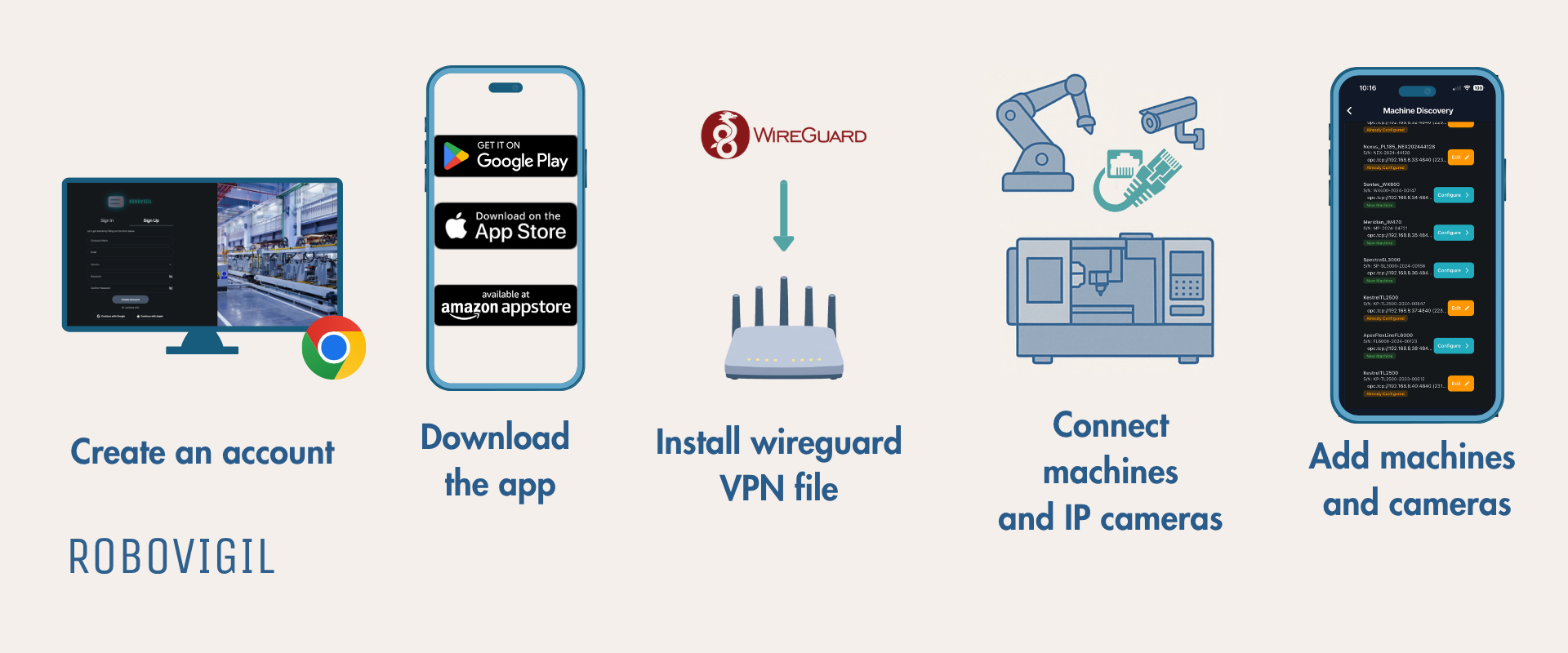
Step 1: Create an Account
Sign up at app.robovigil.com or via the app on your phone. You’ll need a company name and a valid email address. Your account includes a 30-day free trial with full access to every feature. Give your factory a name and add the production lines.

Step 2: Download the App
RoboVigil is available on iOS, Android, Amazon devices, and as a web app. The mobile app delivers push notifications for faults and alerts — the web dashboard gives you the same data on a bigger screen and greater access to your account details.



Step 3: Set Up Your Secure Connection
From the app, go to Factory Management → your factory → VPN Configuration and generate a WireGuard config file. Download it and load it onto your router. That’s your encrypted tunnel established.
No ports need opening on your firewall. No specialist networking knowledge required. Most modern business routers support WireGuard natively — if yours doesn’t, an inexpensive gateway device (such as a GL.iNet Brume) will do the job.
If connection to the factory network is impossible then 4G/5G gateways with built in WireGuard are inexpensive and simple to set up. Options include the Teltonika RUT200 or RUT276 for bigger installs.
Once the tunnel is live, RoboVigil can reach your machines and cameras securely.
Step 4: Add Your Machines
Add your machines one of two ways, depending on the protocol.
For ABB, Universal Robots and FANUC robots, and for MQTT/Sparkplug B equipment, go to Machine Setup and add each machine directly — select the manufacturer and protocol, and RoboVigil guides you through the rest.
For OPC-UA equipment, use Machine Discovery. RoboVigil scans your network, automatically finds OPC-UA machines and identifies their type and manufacturer. Select the ones you want to monitor and RoboVigil maps their available data points: cycle counts, operating states, temperatures, speeds, fault codes and more.
Works with any suitable equipment regardless of manufacturer: ABB, FANUC, KUKA, Siemens, Mitsubishi, Universal Robots, Omron, Beckhoff, and others. Even complex installs can be connected quickly using just your phone.
For machines requiring OPC-UA security certificates, download one directly from the Factory Configuration Page in the app and load it into your machine’s configuration. We have tried to cover everything. If we haven’t, let us know!
Step 5: Connect Your Cameras
Go to Camera Setup and enter the IP address and RTSP credentials for each camera. Any standard IP camera with RTSP streaming works such as the Reolink 520A— no proprietary hardware needed. Link cameras to specific machines so that when a fault occurs, RoboVigil captures a snapshot automatically and delivers it with the alert.
PoE cameras are the simplest option — one network cable for power and data.
📖 User Guide
The full user guide is available inside the app under Menu → User Guide, or access it directly here: Robovigil User Guide we have made it LLM friendly – copy and paste it into the agent of your choice.
🖥️ Try the Demo
Want to see RoboVigil in action before connecting your own machines? Log in with the demo account to explore a live factory with real machine data and camera feeds. Hit the demo button on the login page to see machine sims of different types running live.
Web dashboard: app.robovigil.com
❓ What You Need
RoboVigil is software-only. There’s nothing to install on your factory floor. You provide three things:
🔒 A router that supports WireGuard — most modern business routers support it, or add an inexpensive gateway device. The connection can even be via a 4G/5G mobile connection if needed.
📷 Standard IP cameras — any RTSP-compatible camera works. Position them where you need visibility. Connect them up via our WireGuard tunnel. This gives you visibility without exposing anything to the wider internet.
⚙️ Supported machines — Industrial robots connect directly using their own protocols – no software options needed. Most CNCs, injection moulders, PLCs and other machine controllers support MQTT or OPC-UA natively. For older equipment, inexpensive protocol bridges can bring legacy machines into the same monitoring environment.
👇 Need Help?
Contact us: robovigil.com/contact Email: hello@robovigil.com
Please remember we are Hagen Automation – with over 20 years of supplying, designing and installing industrial equipment we can help make RoboVigil work for you. We can design, build and deliver machine specific connectors and are happy to help.