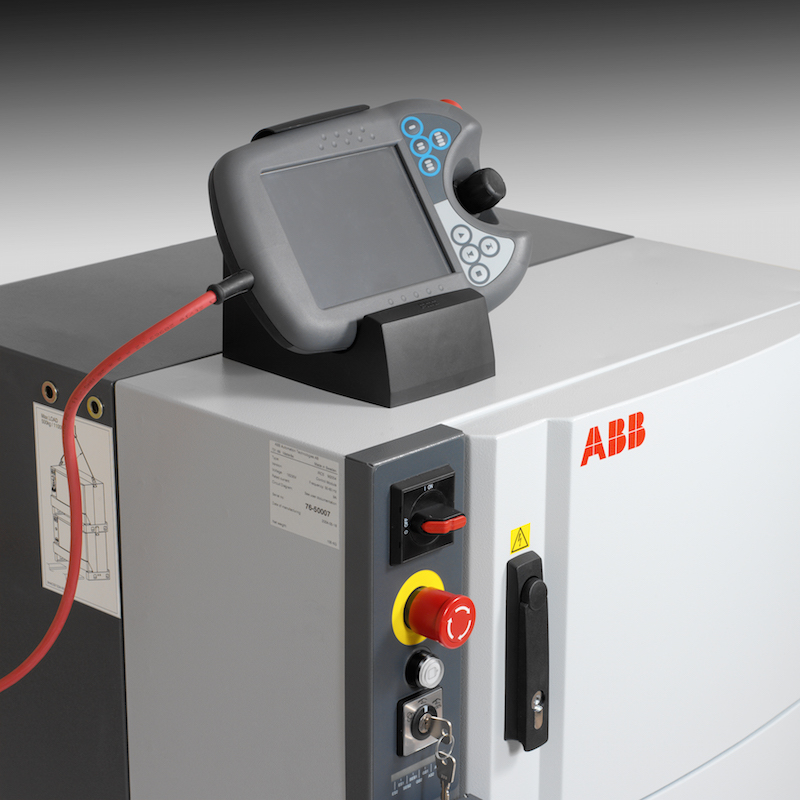
ABB has an installed base of over 300,000 industrial robots worldwide. A significant proportion of those run on the IRC5 controller — the workhorse platform that ABB shipped from 2004 through to the OmniCore transition. If you run ABB robots in production, the chances are high that you have IRC5 controllers on the shop floor. This post covers what monitoring data the IRC5 actually exposes, how RoboVigil connects to it without OPC-UA licensing or edge hardware, and what you can see remotely once it’s live. We love ABB robots…. all the way back to the S3 IRB 6000 we first programmed – this is why they are one of the first bespoke connectors we have added to RoboVigil.
Why ABB IRC5 Robots Need Remote Monitoring
An ABB robot cell in production is typically part of a larger process — welding a chassis, tending a CNC machine, palletising at the end of a packaging line. When the robot stops, the process stops. A protective stop at 3am on a palletising cell doesn’t just halt the robot — it backs up the entire line behind it. Product stacks up, conveyors stall, and if no one notices until the morning shift walks in, that’s hours of lost throughput from equipment that was physically capable of running.
Most ABB sites have no remote visibility into robot status. The FlexPendant shows everything you need — but you have to be standing next to it. RobotStudio can connect over the network, but it’s an engineering tool, not a monitoring platform. There’s no push notification when a fault occurs. No historical view of how often cell 4 has gone into emergency stop this month versus last month. No camera snapshot showing what the cell looked like the moment it faulted.
That gap between “the robot stopped” and “someone noticed” is where production hours disappear. RoboVigil closes it. The whole point of robotic automation and lights out factories is that there is no one there standing over the robot. Robovigil de-risks that.
What Data Does an IRC5 Controller Expose?
ABB provides a built-in HTTP-based API on the IRC5 called Robot Web Services (RWS). It’s a REST interface — standard HTTP requests, responses in XML or JSON — that exposes the controller’s internal state to any networked client. No additional hardware. No licence add-on. It’s part of the base RobotWare installation on every IRC5 running RobotWare 6.0 or later (released late 2014). The majority of IRC5 controllers in active production will be running RW6 — either shipped with it or upgraded. Older IRC5s still on RobotWare 5.x can be upgraded, though some early units (pre-2006) may need a main computer board swap to support it.
RWS is structured around a set of services, each covering a different domain of the controller. The ones that matter for monitoring are:
Controller State and Operating Mode
RWS exposes the controller’s current state: motors on, motors off, guard stop, emergency stop, emergency stop reset, system failure. It also reports the operating mode — automatic or manual — and the current speed override percentage. For monitoring purposes, these data points tell you whether the robot is capable of running production and whether it’s running at full speed. A controller sitting in “E-stop” at 2am when it should be in “motors on” running automatic is an immediate alert condition. A robot running at 50% speed override when it should be at 100% is a subtler signal — but one that explains why throughput dropped on the night shift.
Event Log
The IRC5 maintains a detailed event log, and RWS provides full access to it. Each entry includes a sequence number, timestamp, message type (information, warning, or error), an event code, a title, a description of what happened, the probable causes, and recommended actions. This is the same information a maintenance engineer reads on the FlexPendant when diagnosing a fault — except RoboVigil can read it remotely, the moment the event is logged.
The event log is where the real diagnostic value sits. A protective stop event doesn’t just say “protective stop” — it gives you the specific error code, the axis involved, and what the controller thinks caused it. That’s the difference between sending a maintenance engineer to the cell with a vague “the robot stopped” and sending them with “joint 3 collision detection triggered during program Main, routine Pick_Part, at position P12.” RoboVigil carries a parsed catalogue of over 3,500 IRC5 fault codes, so alerts include not just the raw event but the title, probable causes, and recommended actions — the same diagnostic detail a maintenance engineer would read on the FlexPendant, delivered to their phone. Added to this RoboVigil will save a camera shot when the error was triggered so you can likely SEE what caused the problem.
RAPID Program State
RWS reports which RAPID program is loaded, whether it’s running, and the current execution state. For cells that run different programs for different products, knowing which program is active — and whether it’s actually executing — is essential context. A robot loaded with the wrong program isn’t a fault, but it is a production problem.
I/O Signals
Every digital and analogue I/O signal configured on the controller is accessible through RWS. Signal name, type, current value — all readable over the network. In most robot cells, the I/O tells you what’s happening in the wider process: part present on fixture, gripper closed, weld gas flowing, conveyor running. RoboVigil can track these signals and use them as part of cycle detection and alerting logic.
Motion System Data
Joint positions, TCP (tool centre point) position and orientation, speed data, and mechanical unit status are all available. For monitoring (as opposed to real-time control), the value here is in tracking trends — a joint that’s consistently reporting position errors, or a mechanical unit that’s been in a “not activated” state when it shouldn’t be.
What RWS Doesn’t Expose
RWS is a monitoring and configuration interface, not a real-time control bus. It’s fast enough for production monitoring — polling every few seconds captures every state change that matters — but it’s not a substitute for EGM (Externally Guided Motion) if you need millisecond-level real-time control. RoboVigil is a monitoring platform, so the RWS update rate is a natural fit.
RWS also supports WebSocket subscriptions for event-driven updates — the controller pushes state changes to subscribers rather than requiring continuous polling. RoboVigil uses this where available to improve response time to fault events.
Why Not Just Use OPC-UA?
ABB offers OPC-UA on the IRC5, but it requires the IoT Data Gateway option (3HAC076723-001), which replaced the older IRC5 OPC Server that was phased out in 2023. The IoT Data Gateway is a paid add-on, and it requires the PC Interface option (616-1) if not already installed. Between the two, you’re looking at a few thousand pounds per controller before you’ve connected anything. For a site with ten IRC5 robots, that adds up quickly — just to expose the data that RWS already provides for free.
RWS is already there. Every IRC5 running RobotWare 6.0 or later has it available as part of the base installation. RoboVigil connects directly to RWS, which means you can start monitoring your ABB robots using infrastructure that’s already installed and paid for. No additional ABB options, no licence keys, no Windows PC running gateway software.
For sites that do have the IoT Data Gateway or legacy OPC Server licensed on their IRC5 controllers, RoboVigil supports OPC-UA as a connection path too — see our OPC-UA for Machine Monitoring guide for more on that route. But for the majority of IRC5 installations where OPC-UA was never purchased, the RWS connector removes the barrier entirely.
How RoboVigil Connects
RoboVigil’s ABB connector is purpose-built for Robot Web Services. It authenticates with the IRC5’s user authorisation system, establishes a persistent session, and subscribes to controller state, operating mode, speed ratio, RAPID execution state, event logs, and I/O signals. No ABB SDK or client libraries are required — RWS is a standard REST API, and RoboVigil connects to it using standard HTTP.
The deployment process:
On the factory side: The IRC5 controller needs to be on the factory network via its WAN Ethernet port (the service port won’t work — it’s for local maintenance connections only). A WireGuard VPN tunnel is configured on your existing router to create a secure, encrypted connection to RoboVigil’s cloud infrastructure. No port forwarding required. No firewall rules to negotiate with IT. No hardware to install.
On the RoboVigil side: You set up the machine in the RoboVigil app, enter the IRC5’s IP address (as seen through the VPN), and the connector starts pulling data. There’s no software to install on the IRC5 controller. No USB stick, no system parameter changes, no RobotWare options to activate. The connector reads from an interface ABB designed specifically for external systems.
For sites without existing LAN internet: If the robot cell is in a facility with no wired internet connection to the router, a cellular gateway such as the Teltonika RUT276 provides a self-contained path — 4G/5G backhaul with WireGuard built in. RoboVigil provides the WireGuard configuration file; you upload it to the gateway’s web interface and the tunnel comes up.
Time to live monitoring: Under an hour from the point your VPN tunnel is configured. The longest step is getting the WireGuard tunnel established on your router — the RoboVigil side is configuration, not installation. Simply download the configuration template file, fill in your application specific details and upload it. You can do it from your phone or via the web app and you don’t need to be anywhere near the machine.
What You See in RoboVigil
Once the connector is live, the RoboVigil app — iOS, Android, or web — gives you:
Live status with camera feed. The robot’s controller state, operating mode, and program execution status, updated in real time. If you have an IP camera pointed at the cell (and if you’re monitoring a robot cell remotely, you should), the live video feed sits alongside the data. When an engineer gets a fault alert at 3am, they don’t just see “protective stop” — they see the cell. Part on the floor? Fixture out of position? Obvious before anyone drives to the factory.
Push alerts on fault events. Protective stop, emergency stop, system failure — RoboVigil sends a push notification to your phone the moment the event log registers it. The alert includes the event code and description pulled from the controller’s own log, so the engineer receiving it knows whether it’s a “clear and restart” situation or something that needs physical intervention. Alerts with camera snapshots are the capability that changes behaviour — they turn a monitoring platform from a dashboard you check occasionally into a system that actively tells you when something needs attention.
Event log history. Every event the IRC5 logs is captured and stored in RoboVigil’s cloud. You can see that this robot has thrown the same collision detection warning 14 times in the past month, and that it started after the last tool changeover. Patterns like that are invisible when fault data lives only on the FlexPendant and gets cleared periodically. You can see and compare different robots data and fault numbers over time.
Production timeline. Running, idle, faulted — charted over time. You can see at a glance how much of the shift the robot was actually producing, and where the gaps were. Over weeks and months, this builds into a utilisation picture that no one on the shop floor has time to compile manually.
What RoboVigil Doesn’t Do
RoboVigil reads data from the IRC5. It doesn’t write to it. There’s no remote start/stop, no program upload, no jogging, no parameter changes. This is deliberate. Remote control of an industrial robot raises safety, liability, and access control questions that are entirely separate from remote monitoring. RoboVigil’s scope is visibility and alerting — know what your robots are doing, know the instant they stop, and have the diagnostic context to respond efficiently.
RoboVigil is also not a replacement for RobotStudio or the FlexPendant. Those are engineering tools for programming, commissioning, and detailed diagnostics. RoboVigil is for the operations manager who needs to know that all 12 robot cells across two factories are running, and for the maintenance lead who needs to know the moment one of them isn’t.
ABB IRC5 vs OmniCore
The IRC5 is ABB’s current-generation controller for the majority of installed robots, but ABB’s newer OmniCore platform (running RobotWare 7) is shipping with new robot models. OmniCore also supports Robot Web Services, with an updated API (RWS 2.0). RoboVigil’s ABB connector roadmap includes OmniCore support — the RWS architecture is similar, with differences in authentication (OmniCore supports certificate-based TLS) and some API endpoint changes. The same approach RoboVigil took with Universal Robots — connecting to the manufacturer’s native interfaces rather than requiring OPC-UA add-ons — applies here.
If you’re running a mixed fleet of IRC5 and OmniCore controllers, RoboVigil will provide a single monitoring view across both — same alerts, same production timeline, same app.
What It Costs
£150 per machine per month. That’s the robot as a monitored machine — one price, all features included. No per-user fees, no tiered plans where you need to upgrade to get alerts or API access. Camera feeds from your existing IP cameras are included at no extra cost.
For context: one hour of unplanned downtime on a robot cell that feeds a production line typically costs more than a full year of RoboVigil monitoring. We’ve written about that maths in detail in RoboVigil vs Doing Nothing — the real competitor for most factories isn’t another monitoring platform, it’s ignoring the problem.
Who This Is For
If you run ABB IRC5 robots in production and you currently rely on someone walking past the cell to notice when something goes wrong, RoboVigil gives you real-time visibility and instant alerts without any hardware installation or software licensing on the controller. It’s built for operations and maintenance teams who need to know what’s happening on the shop floor without being on the shop floor.
Likewise if you are a programmer or integrator with ABB robot installations scattered across the country. Robovigil will tell you there’s an issue before your customer does and give you the data to diagnose and hopefully fix the problem quickly and easily.
If you need deep offline programming, simulation, or real-time robot control, those are RobotStudio and EGM — different tools for different jobs. RoboVigil sits alongside them, filling the gap between “the robot faulted” and “someone found out.”
Try it on your own machines — sign up at robovigil.com and connect your first ABB robot in under an hour.