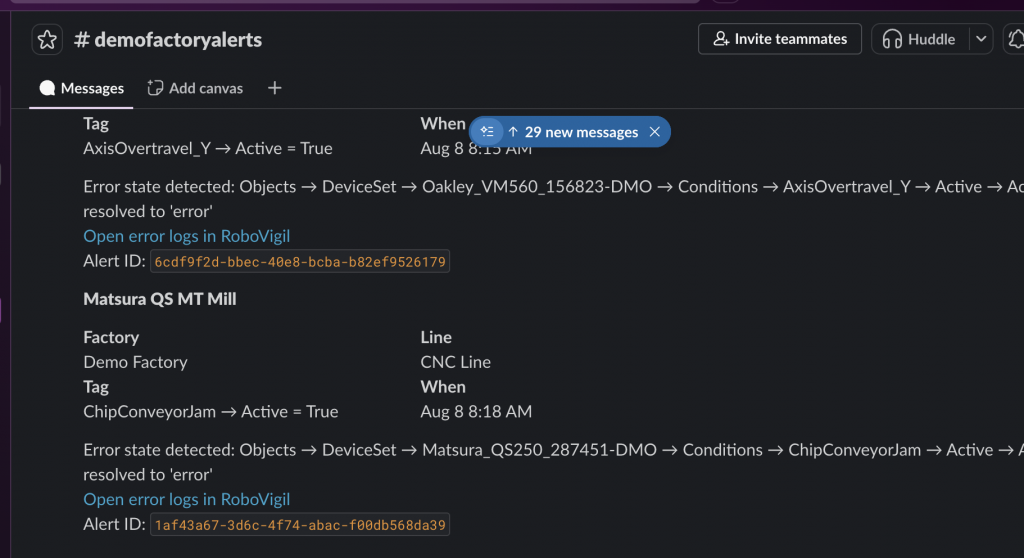

Your team doesn’t need to leave Slack to know a machine is down. RoboVigil now posts every fault alert for a factory straight into the channel you choose.
The push notification on your phone is still the primary way RoboVigil tells you a machine has a problem — it’s immediate, it’s personal, and it follows you out of the building. But plenty of companies live in Slack. Maintenance channels, production channels, a channel per site. If that’s where your team already looks, the alert should be there too.
How It Works
You store one Slack webhook URL against a factory in RoboVigil. From that moment, every alert for that factory posts to the channel you chose — machine name, factory, line, the tag that triggered it, when it happened, and a link into RoboVigil. The alert time displays in each reader’s own timezone, because Slack handles that for us.
There’s no per-user setup and no notification preferences to manage. Anyone who wants the alerts joins the channel. Anyone who doesn’t, doesn’t. The channel membership is the distribution list, which is exactly how Slack is supposed to work.
Do Not Disturb
Do Not Disturb and muting in the RoboVigil app apply to your personal push notifications only. Channel posts are factory-wide and unaffected — the channel always gets the alert, even when your phone is set to stay quiet overnight. That’s deliberate. Your DND settings are about you; the channel is about the factory.
Setting It Up
It takes about five minutes:
- In Slack, create a channel for the alerts — #machine-alerts, or one per site if you prefer
- At api.slack.com/apps, create an app for your workspace and switch on Incoming Webhooks
- Add a webhook, pick your channel, and copy the URL
- In RoboVigil, open Factory Configuration, tap Slack alert webhook, paste the URL and save
Saving sends a test message to the channel. RoboVigil only stores the URL if that test succeeds — so if you see the confirmation appear in Slack, you know the whole path works. No saving something broken and finding out during a fault.
Free Slack workspaces work fine. The full walkthrough is in the app’s user guide.
Why a Channel and Not Individual Messages
Because a machine fault isn’t personal. When a robot stops at 2am, the question isn’t “who was subscribed” — it’s “who saw it and who’s dealing with it.” A channel gives you that: the alert lands once, everyone in the channel sees the same thing, and the conversation about what to do happens right underneath it. Threads under an alert are a maintenance log that writes itself.
It also means alerts reach people who’d never install another app. The shift supervisor who lives in Slack all day gets the alert where they already are.
Using Teams instead?
The same feature exists for Teams — see Send Machine Fault Alerts to Teams with RoboVigil. You can configure both on the same factory if your teams are split across the two.
Slack alerts are live today on every RoboVigil factory. Open Factory Configuration, add your webhook, and put machine faults in front of everyone who needs to see them.
Any questions: hello@robovigil.com