
People sometimes ask why a machine monitoring platform needs cameras. The data tells you the machine has stopped, an alarm code tells you why — what’s the camera for?
The honest answer is that the data only ever tells you half the story.
Data tells you what. Cameras show you why.
An alarm code will tell you that a robot has faulted on a collision detect. It won’t tell you that a loose harness has worked its way into the path of axis three. It won’t show you the part that was dropped two cycles earlier and is now sitting where the gripper expects to find an empty fixture. The numbers say “stopped, error 4031”. The camera shows you what actually happened.
Anyone who has spent time fault-finding on robotic systems knows this pattern. You can VPN into a controller and stare at a status screen for as long as you like — it doesn’t always help. What you need is to see the cell. The screenshot RoboVigil captures at the moment of the fault, or the live feed, fills in the rest of the story.
It puts the right person in the room
When a cell stops at 2am, the information normally travels like this: the operator describes it to the shift supervisor, who describes it to the maintenance lead, who rings the integrator, who asks a series of questions that nobody on site can quite answer. Every link in that chain loses detail. By the time the person who could actually diagnose the fault hears about it, they’re working from a third-hand description over the phone.
Cameras cut that chain out entirely. The most experienced, most informed person — whether that’s your own automation engineer or your integrator — looks at the cell immediately, sees what happened, and makes the call. Not a description of what happened. The thing itself, when it happened.
That’s the difference between “the robot’s stopped and there’s something near the conveyor, I think” and a decision being made in two minutes.
Better than being there
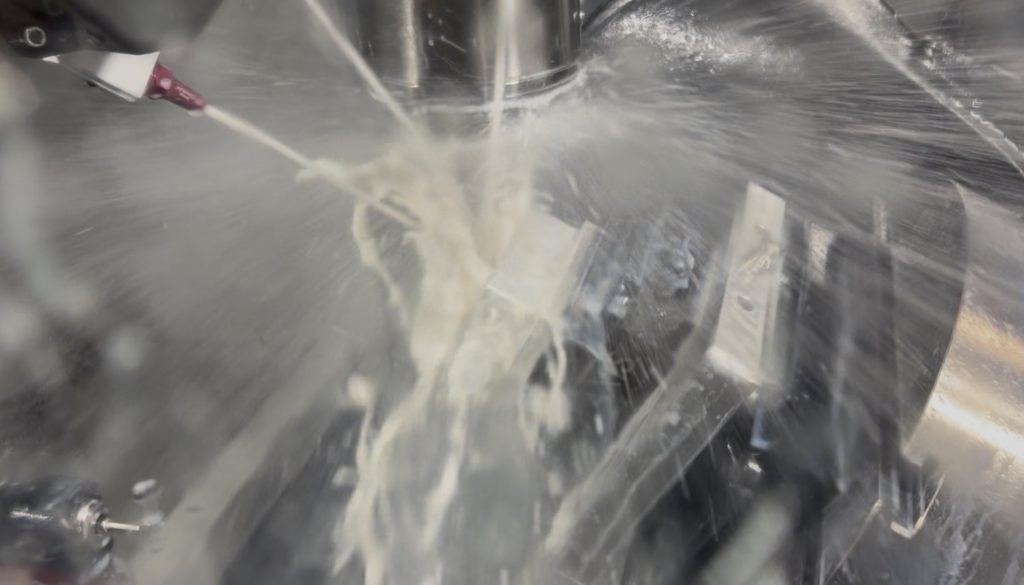
There’s another point that’s easy to forget until you’re stood on the shop floor: many robot cells are hard to see into even when you’re right next to them. Guarding, fencing, light curtains and mesh panels all do their safety job well — and get squarely in the way of watching the process. With a CNC machine you’re often peering through a coolant-smeared window, if there’s a window at all.
Some processes go further: you cannot and should not be looking in at all. A MIG welding cell is screened off precisely because the arc will damage your eyes, and a waterjet cutter is fully enclosed because of what the jet would do to anything else it met. The very processes you most need to watch are the ones you’re rightly prevented from watching.
Put a camera inside the cell — or inside the machine itself — and you get a view that simply isn’t available any other way. You see the gripper approach the fixture, the torch reach the joint, the tool meet the part. In many cases the camera gives you better visibility than the person standing beside the machine has — and in the case of welding or waterjet cutting, a view nobody can have in person.
Cheap cameras, deliberately
We use inexpensive, off-the-shelf IP cameras. That’s a deliberate choice, not a compromise.
You don’t need industrial vision cameras to watch a cell. Vision systems exist to make measurements — guiding robots, inspecting parts, reading codes. That’s not what we’re doing. We’re giving a human eyes on the machine, and a decent consumer IP camera does that job perfectly well. The image quality is there; the cost isn’t.
It also makes monitoring accessible. Adding a camera to a cell costs tens of pounds, not thousands, so there’s no reason not to cover every machine that matters.
Nothing goes through the camera vendor
The obvious objection to cheap IP cameras is security, and it’s a fair one — most consumer cameras want to phone home to a cloud service somewhere.
RoboVigil doesn’t work that way. The cameras sit on your local network and the video runs directly from your network to the RoboVigil front end, secured over WireGuard. Nothing goes to the camera manufacturer, nothing goes through their cloud, and the cameras never need internet access of their own. Your factory footage stays between your factory and you.
Most monitoring systems don’t have eyes
Here’s the part that still surprises me: almost no SCADA or machine monitoring system includes cameras. They’ll give you dashboards, OEE figures, alarm lists — numbers, in other words — and leave you to work out the rest of the story for yourself.
In RoboVigil, cameras aren’t a bolt-on. The feed is integrated into each machine’s view page, alongside its live data, and screenshots are tied directly into the error log — so when you open a fault, the picture of what the cell looked like at that moment is right there next to the alarm. Data and eyes in one place. It’s one of the biggest differences between RoboVigil and everything else on the market, and once you’ve fault-found with it, going back to numbers alone feels like working blindfolded.
Run harder, watch closer
The case for cameras gets stronger the harder you run your machines. If you’re pushing for more hours from the equipment you’ve got — and especially if some of that equipment is getting on a bit — unattended running is where the value is, and unattended running is exactly when you can’t see the cell. The camera is what makes leaving the building credible.
It’s the same thinking behind the rest of RoboVigil: connect to the machine natively, whether that’s an ABB IRC5, a Universal Robots cobot or a FANUC, pull the data, and pair it with eyes on the cell.
We built it this way because we’ve spent decades fault-finding robot cells ourselves — Hagen Automation has been working hands-on with industrial robots for over 25 years, and we know exactly how much time gets burned working from second-hand descriptions of a fault.
The data tells you something’s wrong. The camera tells you what to do about it.
Try RoboVigil free for 30 days — create your account at app.robovigil.com.